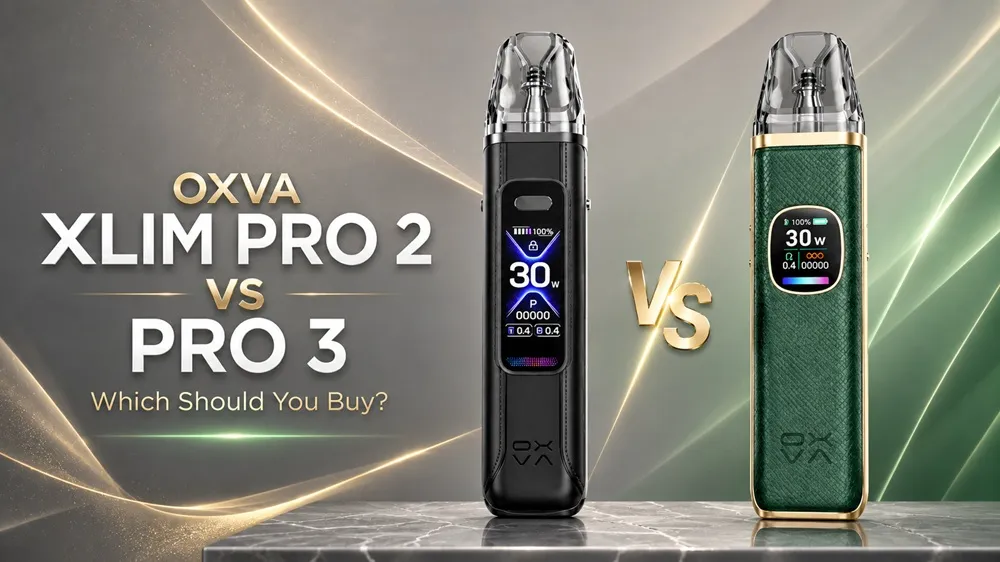
The OXVA Xlim Pro 2 and Xlim Pro 3 are closely matched pod kits, but the Pro 3 introduces several worthwhile upgrades. It has a larger battery, a much bigger screen, button firing and OXVA’s newer Pulse System.
That does not automatically make the Xlim Pro 2 the wrong choice. It remains lighter, more compact and straightforward to use, while offering adjustable power up to 30W and compatibility with the wider OXVA Xlim pod range.
This OXVA Xlim Pro 2 vs Pro 3 comparison explains exactly what has changed and which device is likely to suit you best.
OXVA Xlim Pro 2 vs Pro 3: The Main Difference
The Xlim Pro 2 is the lighter and simpler device. It has a 1300mAh battery, a compact 0.56-inch HD colour screen and auto-draw activation. Its function button powers the device on and off, adjusts the wattage, and controls its settings, but the standard Pro 2 is activated for vaping by inhaling.
The Xlim Pro 3 increases battery capacity to 1500mAh, adds a larger 1.05-inch HD colour screen and supports both button firing and auto-draw activation. It also introduces OXVA’s Intelligent Photon Chip and Pulse System, designed to provide more stable power and flavour throughout each draw.
For most customers buying a new device, the Xlim Pro 3 is the more complete option. The Xlim Pro 2 remains appealing when lower weight, simpler auto-draw vaping or a lower purchase price matter more.
OXVA Xlim Pro 2 vs Pro 3 Specifications
| Feature | OXVA Xlim Pro 2 | OXVA Xlim Pro 3 |
|---|---|---|
| Battery | 1300mAh | 1500mAh |
| Output range | 5–30W | 5–30W |
| Vape activation | Auto-draw | Button and auto-draw |
| Controls | Function button for settings | Fire and function button |
| Screen | 0.56-inch HD colour screen | 1.05-inch HD colour screen |
| Chipset | Standard regulated chipset | Intelligent Photon Chip |
| Pulse System | No | Yes |
| Pod compatibility | OXVA Xlim pod range | OXVA Xlim pod range |
| Included pods | Xlim top-fill pods | V3 top-fill UniTech 2.0 pods |
| Charging | USB-C, 5V/2A | USB-C, 5V/2A |
| Dimensions | 114.5 × 25 × 15mm | 119.9 × 25.7 × 15mm |
| Weight | Approximately 67g | Approximately 77.4g |
| Best suited to | Lightweight, simple, everyday use | Longer battery life and greater control |
Battery Life: 1300mAh vs 1500mAh
The OXVA Xlim Pro 3 has a 1500mAh built-in battery, compared with the 1300mAh battery inside the Xlim Pro 2. This gives the Pro 3 approximately 15% more battery capacity.
That should provide longer use between charges, although actual battery life will depend on your chosen pod resistance, wattage, draw length and vaping frequency. Lower-resistance pods operated at higher wattages will use more power than higher-resistance mouth-to-lung pods.
Both devices support USB-C 5V/2A fast charging. OXVA states that the Pro 3 can reach approximately 80% charge in around 30 minutes.
Battery winner: OXVA Xlim Pro 3.
Controls: Auto-Draw or Button Firing?
The standard Xlim Pro 2 uses auto-draw activation when vaping. Simply inhale through the mouthpiece, and the device activates automatically.
It does have a function button, but this is used to switch the device on and off and manage settings rather than manually fire the coil. This makes the Pro 2 particularly straightforward for people moving from disposable vapes or basic inhale-activated pod kits.
The Xlim Pro 3 supports both auto-draw and button firing. You can activate it simply by inhaling or pressing the physical button when you prefer manual control.
The Pro 3’s button is also used to access the menu, adjust wattage, lock the device and switch it on or off.
Choose the Pro 2 if you prefer straightforward auto-draw vaping.
Choose the Pro 3 if you want the option of both button firing and auto-draw activation.
Screen and Chipset
One of the most noticeable differences is the screen.
The Xlim Pro 2 uses a compact 0.56-inch HD colour display. It shows essential information such as battery level, wattage, coil resistance and puff count without adding unnecessary size to the device.
The Xlim Pro 3 upgrades this to a substantially larger 1.05-inch HD colour screen. The larger display makes information easier to read and provides more room for its selectable themes, effects and on-screen information.
The Pro 3 also introduces OXVA’s Intelligent Photon Chip and Pulse System. This uses high-frequency pulse power delivery to provide more stable output during each draw and as the battery level falls.
The Xlim Pro 2 still offers adjustable wattage and regulated output, but it lacks the Pro 3’s Pulse System.
Screen and power-delivery winner: OXVA Xlim Pro 3.
Do the Xlim Pro 2 and Pro 3 Use the Same Pods?
Yes. Both devices are compatible with the wider OXVA Xlim pod range.
The OXVA Xlim V2 and V3 replacement pods include current V3 top-fill cartridges and remaining V2 options. Both devices can also use OXVA Xlim EZ replacement pods, giving existing Xlim users more choice in pod style and resistance.
The Xlim Pro 3 is supplied with newer V3 top-fill pods featuring OXVA’s UniTech 2.0 technology, but it is not limited to them. Existing Xlim users can continue using compatible V2, V3 and EZ cartridges when moving to the Pro 3.
The pod range includes several resistance options for mouth-to-lung and restricted direct-to-lung vaping. Pod compatibility is therefore unlikely to decide this comparison. The more important differences are battery capacity, screen size, activation options and the Pro 3’s Pulse System.
Size, Weight and Portability
The Xlim Pro 2 measures approximately 114.5 × 25 × 15mm and weighs around 67g.
The Xlim Pro 3 is slightly larger at approximately 119.9 × 25.7 × 15mm and weighs around 77.4g. Its additional size accommodates the larger battery, bigger screen and upgraded controls.
Both remain compact enough for everyday pocket use, but the difference should be noticeable when held side by side. The Pro 2 feels lighter and more minimal, while the Pro 3 has a more substantial feel in the hand.
Portability winner: OXVA Xlim Pro 2.
Is the Xlim Pro 3 Better for Flavour?
Both devices use the established OXVA Xlim pod platform and can deliver excellent flavour with the correct pod and e-liquid.
The Pro 3’s advantage is its Intelligent Photon Chip and Pulse System. Rather than creating a completely different vape style, the system is designed to provide more stable power and consistent flavour during each draw, even as the remaining battery charge decreases.
The newer V3 UniTech 2.0 pods supplied with the Pro 3 also represent OXVA’s latest Xlim pod technology. However, the pod resistance, wattage and e-liquid used will still have a major effect on overall flavour.
The Xlim Pro 2 remains a strong flavour performer, but the Pro 3 offers the more advanced power-delivery system.
Should You Upgrade From the Xlim Pro 2 to the Pro 3?
The Xlim Pro 3 is a genuine upgrade, but it is not an essential purchase for every Pro 2 owner.
Consider upgrading when you want:
- A larger 1500mAh battery
- A much bigger colour screen
- Button firing as well as auto-draw
- OXVA’s Intelligent Photon Chip
- Pulse System power delivery
- The latest V3 UniTech 2.0 pods are included with the kit
Keeping the Pro 2 makes sense when you are satisfied with its battery life, prefer auto-draw vaping, or value its lighter, more compact design.
The underlying Xlim pod experience remains familiar on both devices, so the upgrade is primarily about endurance, controls, display size and power consistency.
Which OXVA Xlim Pro Kit Should You Buy?
Choose the OXVA Xlim Pro 3 if you want the larger battery, bigger screen, button firing and OXVA’s newer Pulse System. It is the stronger overall choice for most customers buying a new Pro-series device.
Choose the OXVA Xlim Pro 2 if you want a lighter, simpler and potentially more affordable Xlim device with auto-draw activation and adjustable power up to 30W.
Keep your Xlim Pro 2 if you already own one and remain happy with its battery life and auto-draw operation. The Pro 3 improves several areas, but it does not make the Pro 2 obsolete.
Both are capable everyday pod kits, but the Xlim Pro 3 is the better all-around purchase when the price difference is relatively small.
Shop the OXVA Xlim Pro 2 Pod Vape Kit
Is the OXVA Xlim Pro 3 worth upgrading to from the Pro 2? +
The Xlim Pro 3 is worth considering if you want a larger 1500mAh battery, a bigger 1.05-inch screen, button firing or OXVA’s Intelligent Photon Chip and Pulse System. Pro 2 owners who are satisfied with its lighter design, battery life and auto-draw operation may not need to upgrade immediately.
Do the OXVA Xlim Pro 2 and Pro 3 use the same pods?
+
Yes. Both devices are compatible with OXVA Xlim V2, V3 and EZ replacement pods. The Pro 3 is supplied with newer V3 top-fill pods featuring UniTech 2.0 technology, but it is not restricted to those pods.
Which has better battery life, the Xlim Pro 2 or Pro 3?
+
The Xlim Pro 3 has the larger battery, offering 1500mAh compared with 1300mAh in the Pro 2. This gives the Pro 3 approximately 15% more battery capacity, although actual usage time depends on pod resistance, wattage and vaping frequency.
Does the OXVA Xlim Pro 3 have button and auto-draw activation?
+
Yes. The Xlim Pro 3 supports both button firing and inhale activation. The standard Xlim Pro 2 uses auto-draw activation for vaping, although it has a function button for adjusting settings and operating the device.
Which is lighter, the OXVA Xlim Pro 2 or Pro 3?
+
The Xlim Pro 2 is lighter at approximately 67g, compared with around 77.4g for the Xlim Pro 3. The Pro 2 is therefore the better choice when minimum weight and pocketability are priorities.